Structure
Tags, headings and order
Tagged status, marked content, parent tree, role maps, heading sequence, orphaned MCIDs and reading-order mismatches.

Open tool · MCP
A free, local-first accessibility auditor for Claude, Cursor and other MCP clients. It reads the PDF’s real structure, returns cited findings, and writes a report you can send to a reviewer.
No account, no API key, no model call. The document stays on your machine.
What it finds
The audit checks the PDF object model, not a screenshot. Findings carry a rule ID, severity, standards mapping, evidence where available and a concrete remediation step.
Structure
Tagged status, marked content, parent tree, role maps, heading sequence, orphaned MCIDs and reading-order mismatches.
Tables and forms
Table headers, Scope/Headers, empty cells, field names, tooltips, duplicate names and tab order.
Text and pages
Image-only pages, sparse text, embedded fonts, ToUnicode, document language, display title and metadata.
Evidence
Each finding carries a rule ID, severity, standards reference, the page and element when they apply, the evidence the parser saw, and a concrete fix. No mystery score.
Report
One file with no external fonts, scripts or tracking. Print-friendly, responsive and accessible in light and dark modes.
MCP
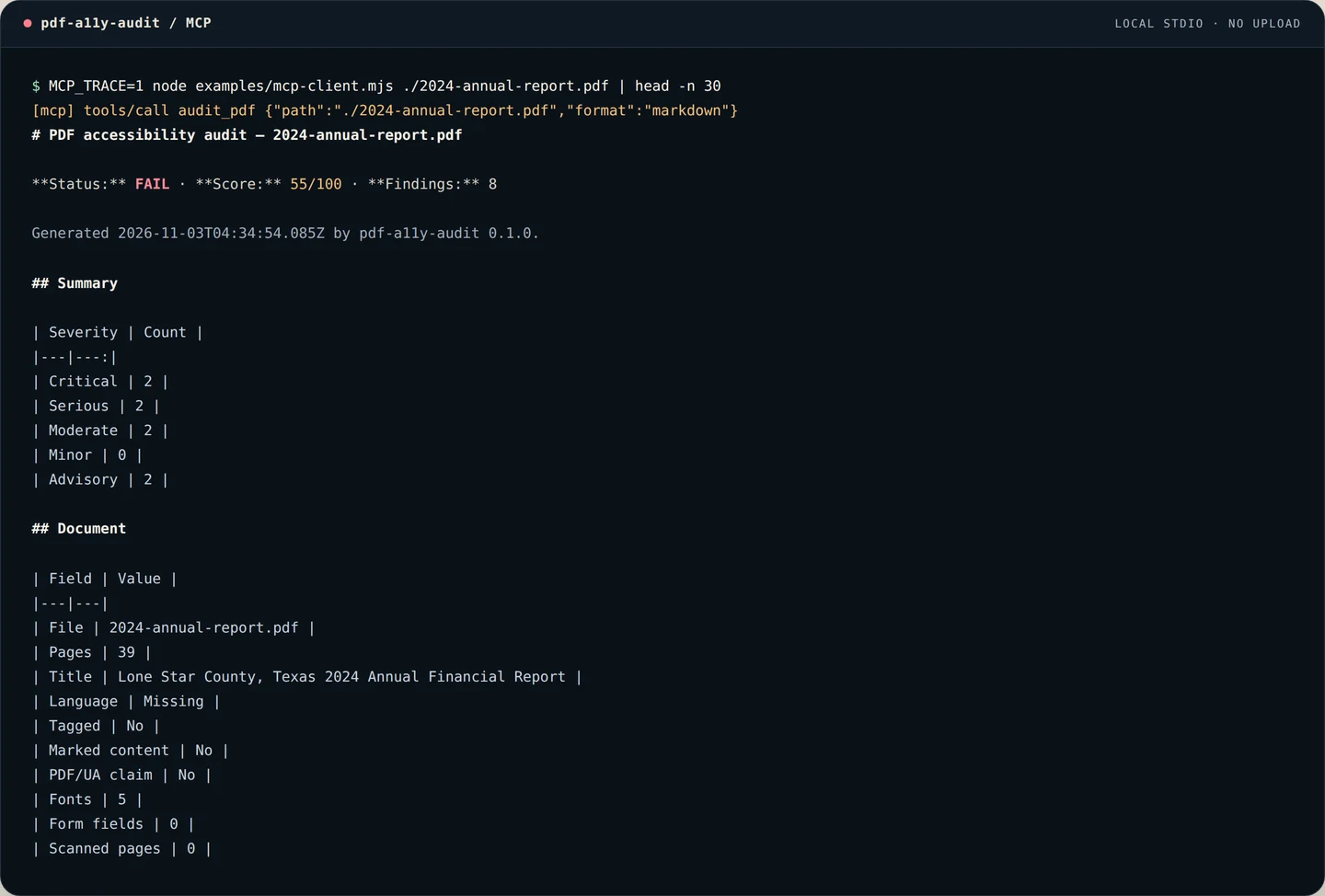
Audit one file, audit a folder, explain a rule, list checks, compare reports and render HTML — all local tools.
MCP in the loop
Ask an MCP client to audit a PDF. The server returns the findings and, when asked, writes a self-contained HTML report. No upload, no provider account, no model spend.
The report
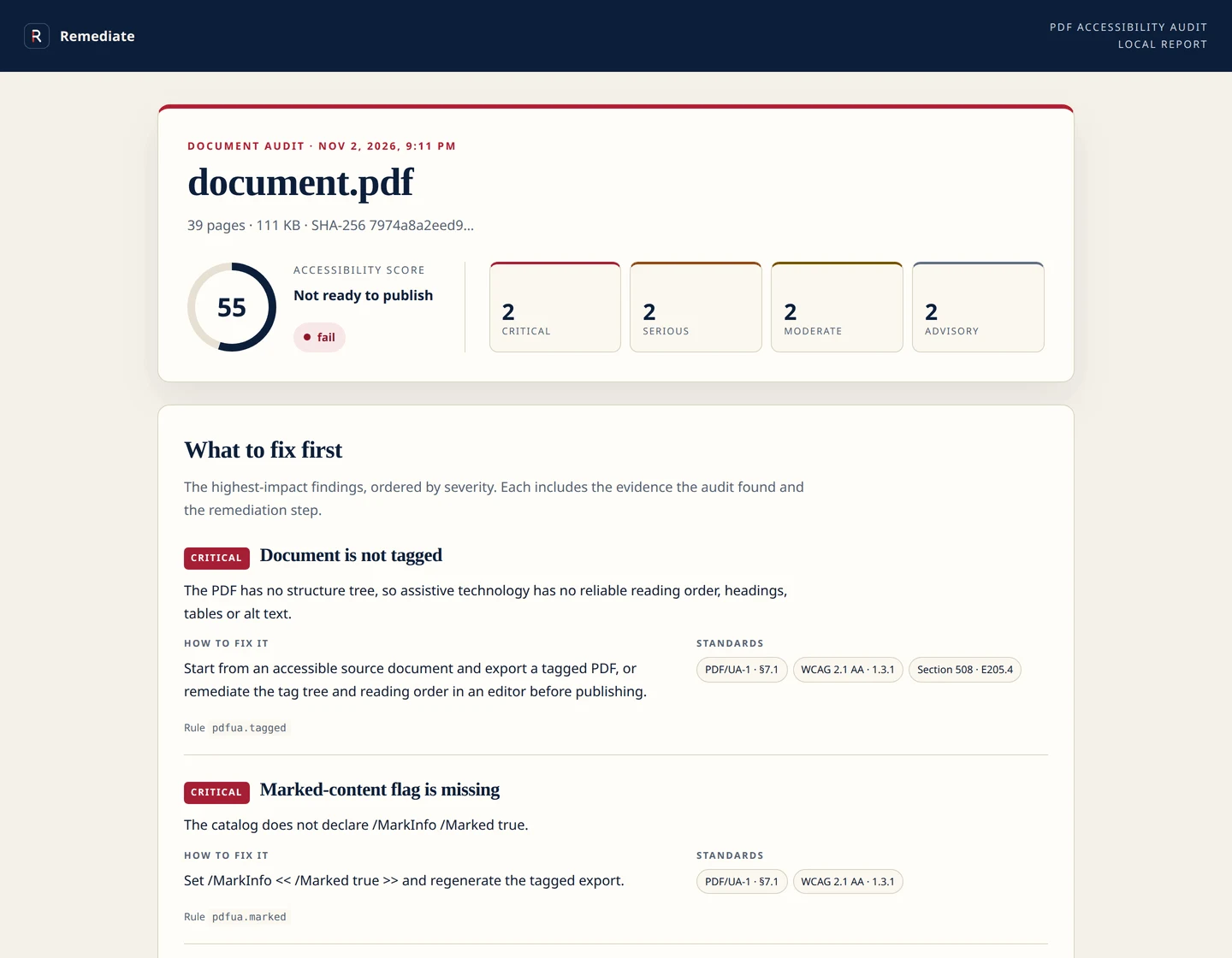
The score is a summary, not the product. The report leads with the highest-impact fixes, shows the evidence, and lists the manual checks that still need a human and a screen reader.
What the reviewer sees
55
out of 100 · 2 critical · 2 serious
Install
git clone https://github.com/Veduis/pdf-a11y-audit.git
cd pdf-a11y-audit
npm install

node bin/cli.js ./2024-annual-report.pdf \
  --format html --out report.html
The npm package is pending release. The source install is available now.
{
  "mcpServers": {
    "pdf-a11y-audit": {
      "command": "node",
      "args": ["/absolute/path/to/pdf-a11y-audit/bin/mcp.js"]
    }
  }
}
Works with any MCP client that supports stdio servers. The server never opens a network connection.
The honest boundary
Automated rules cannot judge colour contrast, alt-text quality, OCR accuracy or whether the reading order makes sense to a person. The report says so and lists the manual checks. Do not publish a conformance claim just because the score passes.
No hosted service, no per-document fee, no inference bill, no account. The package is MIT licensed and runs on your machine.
No “AI-powered” score. Each finding is tied to a rule and a standard, with the page when it applies and a fix that a document author can act on.
Need the whole site covered?
Use the local audit to find the work. Use Remediate when you want the transcript, tables, translation, embeds and accessibility requests handled for every published PDF.